Sound Decisions: Recommender System 🧩
In the previous post of the Sound Decisions series, I explored key insights gathered from the EDA and explained the steps I took to optimise the dataset for a recommender system. As a quick recap, here’s a breakdown of the dataset I’m working with:
| Column | Description |
|---|---|
| Product ID | Product ASIN code |
| Description | Product description |
| Price | Product price |
| Rating | Product rating on a scale of 1 to 5 |
| Is Prime | Binary field showing prime eligibility |
| Wireless | Binary field indicating if product is wireless |
| Noise Cancelling | Binary field indicating if product is noise cancelling |
| Battery Life | Product battery life in hours |
| Microphone | Binary field indicating if product has a microphone |
| Over Ear | Binary field indicating if product is over-ear |
| Foldable | Binary field indicating if product is foldable |
| Gaming | Suitability for gaming |
| price_trans | Transformed price |
| Colour_{colour} | Multiple colour options (encoded) |
Note: There is a column for each colour in the dataset, I have not included it in the data dictionary above as it will make the table too large.
There are a few discrepancies in the data between this post and the first one. Some data issues became clear when building the recommender system. I re-ran the scraping script and did some additional cleaning and processing to address these problems.
In this post, I will discuss what a recommender system, how it works and walk through the steps to build one. I’ll also be showcasing a Streamlit app I built which allows users to input their preferences and receive personalised headphone recommendations.
Recommender Systems
What is a recommender system?
You have probably come across a recommender system without even realising it. One of the most well-known examples is Netflix: an online platform for streaming movies and TV shows.
Whenever you log in, Netflix suggests content that most aligns with your ‘profile’. This could be a trending series or some movies similar to those you’ve previously watched.
But how exactly does it work?
A recommender system suggests items based on patterns and trends found in historical data. It analyses user preferences and behaviour to recommend products that are likely to be of interest for a given user.
The two most popular types of recommender systems are:
-
Content-Based Filtering: This method evaluates the features of items to calculate their similarity. It compares the features that a user likes and suggests similar items. In my case, it would involve using features like battery life, price and noise cancellation to recommend headphones that match a user’s preferences.
-
Collaborative Filtering: A slightly more advanced method, this approach recommends products based on the behaviour and preferences of similar users. If two users have similar tastes, a product one user likes is likely to be recommended to the other. However to be effective, user data (such as purchase history or individual ratings) must be present in the dataset. This was not the case in my project, so I focused on a content-based approach instead.
How It Works in my Project
To start with, I built a content-based recommender system using features of the headphones in my dataset. Below are the steps I followed to create this content-based recommender:
Data Quality Check:
Conducted a quick 4-eyes check on the data after completing EDA. This step allowed me to check the quality of data and refamiliarise myself with the dataset.
TF-IDF Vectorisation on Product Description
Previously in the project, I used regular expressions to extract as many features as possible from the product description column. This was done with the intention of building a system that would allow users to filter products based on their preferences.
For the recommender, I applied Term Frequency-Inverse Document Frequency (TF-IDF) to the product description column. TF-IDF is commonly used in content-based recommenders, particularly when there are text-based columns in the data. This is as TF-IDF splits text data into tokens (which can be single words or phrases) and values each token’s importance relative to all product descriptions.
This is useful in recommenders because it identifies items that share similar tokens, indicating which items are most similar. TF-IDF also represents the text data as vectors (think of this as arrays of numbers). These vectors are important because they allow us to calculate the similarity between products, a key step in the recommendation process.
Below is a bar chart showing the most common terms across the dataset:
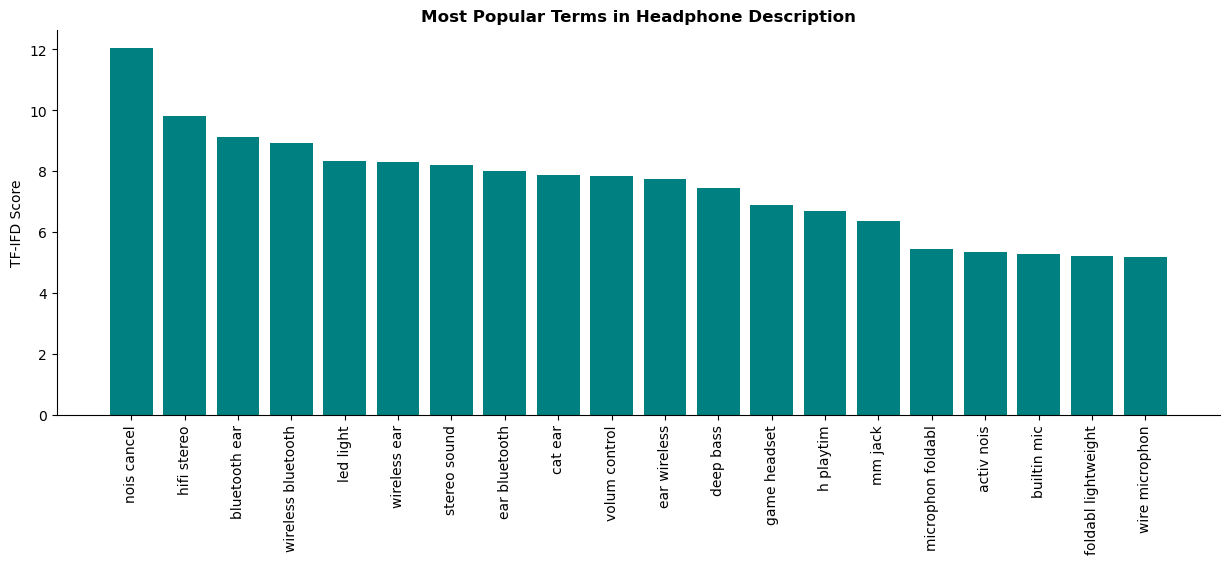
Key Takeaways:
-
Terms like ‘bluetooth’ and ‘wireless’ indicate a strong demand for headphones to be wireless.
-
‘noise-cancel’ (noise_canelling) feature appears popular.
-
The term ‘foldable’ also indicates a preference for headphone portability.
-
Popularity of phrases like ‘hifi stereo’ and ‘deep bass’ suggests importance of audio quality.
Adding Other Features to the Recommender
The next step was to look at the data and see if there were any columns that could be useful in recommendations.
Since the TF-IDF was performed on the product description and I had already extracted some features from this description in the original data, there was a slight overlap in features. Therefore, I decided to include only the following columns in the recommendation process:
-
Price
-
Rating
-
Battery Life
-
Colours (encoded columns)
Note: All columns added had to be numerical, as each product is now represented as a vector.
Before adding these features to the TD-IDF data, I scaled them using a Min Max Scaler to ensure that all features were on a similar scale and so contributed equally to the recommender.
Now, the dataset I am working with contains TF-IDF scores of the tokens along with the scaled features mentioned above.
Calculating Cosine Similarity
Now that all products are represented as vectors, I could calculate the cosine similarity between pairs of products.
To calculate similarity scores, I passed the newly combined data into the cosine_similarity function from sklearn.metrics.pairwise library. This function compares each vector in the data against all others in a pairwise manner. The output of the function is a matrix of scores ranging from 0 to 1. A result closer to 1 indicates perfect similarity, while a result of 0 shows no similarity at all. This similarity matrix becomes the foundation for the recommender system.
Creating Recommender Function
The next step was to build a function that generates product recommendations based on the calculated similarity scores and a product ID. This function takes two input parameters:
-
product_ID: Product to make recommendations off.
-
similarities: Matrix similarity scores computed in the previous step.
The function begins by getting the index of the given product ID to access the corresponding row in the similarity matrix to retrieve the similarity scores related to that product. A new dataframe is then created to hold product IDs and their associated similarity scores, ensuring that the data reflects only the scores of products in relation to the given product ID.
Finally, the DataFrame is sorted in descending order by similarity score and the top five most similar products are returned.
Adding in Collaborative Filtering
To make this recommender even better, I added in some collaborative filtering using the average user rating of products. To do this, I added in the following formula below:
\[\text{Combined Score} = \alpha \times \text{Cosine Similarity} + (1 - \alpha) \times \text{Normalised Rating}\]Formula Breakdown:
-
Cosine Similarity: Angle between two product vectors, indicating how similar the two products are.
-
Normalised Rating: Scaled average product user rating.
-
Alpha: A parameter to weight the influence of each filtering component in the final score.
After researching hybrid recommender systems and consulting ChatGPT, I used this formula to blend content-based filtering and collaborative filtering together to make a hybrid recommender. The function now includes an additional parameter, alpha, which controls the balance between content-based and collaborative filtering. The closer alpha is to 1, the more weight is given to product features and the closer it is to 0, the more weight is given to user ratings.
I also inlcuded the alpha parameter in my Streamlit app, to allow users to experiment with its value to see how it affects the recommendations given.
Testing and Evaluation
One key problem in the evaluation process for this project was the lack of user data. As mentioned earlier, the dataset I worked contained no individual user data. This made it challenging to evaluate the performance of the recommender systems.
I created a function to generate product recommendations and conducted several tests by comparing the features of the recommended items with those of the input product.
Streamlit Demo
As the final part of my project, I developed a Streamlit app that allows users to enter their preferences and receive headphone recommendations. I incorporated this into my existing recommender function. Instead of passing a single product ID, I now pass in the original dataframe along with the filtered dataframe (based on user preferences), the similarity matrix and the alpha parameter. The logic remains the same but now I retrieve the first index of the products in the filtered results and use it to generate recommendations. Recommendations provided are based on the first product that matches the user’s filters.
Users can filter headphones based on various features such as price range, battery life and rating. These filters are then passed into the recommendation model, which analyses the data and outputs the top five suggestions that best match the user’s preferences.
Below is a demo that showcases the features of the web app and the output of the recommender system. Since I unable to deploy this app publicly, you’ll need to clone my GitHub repository to test it out. Detailed steps of how to do this are in the project README.
Challenges of Project
While working on this project, I faced the following challenges:
Data Limitations from Scraping
One of the main challenges I encountered was the lack of user data in the scraped dataset. There were no individual user ratings or reviews, which made it difficult to create truly personalised recommendations. Additionally, I was restricted to extracting features only from product descriptions due to the limitations in the robots.txt file. This proved challenging because the descriptions were often inconsistent, making it harder to extract useful information using regular expressions. In hindsight, using more complex NLP methods could have produced better results.
Real-World Data Challenges
Scraping data often results in messy datasets that require cleaning and preprocessing. Nearly half of the dataset had missing average user ratings. I decided to drop these rows rather than impute the missing values, as I wanted to avoid introducing bias and preserve data authenticity, though I’m not entirely sure this was the best decision. By doing so, I significantly reduced the amount of data available, which likely limited the variety of headphones the recommender system could choose from.
Deployment Challenges with Streamlit
I initially attempted to deploy my app publicly using Streamlit and GitHub workflows. Unfortunately, I could not get this to work and ran out of time. My goal was to make the web app accessible without users cloning my entire project. The best approach would be to explore Flask or FastAPI. Moving forward, I plan to spend some time understanding the best practices for deploying applications. Perhaps in the future, I will write a blog post on deploying machine learning solutions to help others who face the same issue!
Future Work
As I worked on this project, I spotted a few ways to make it better. Unfortunately, I ran out of time and couldn’t implement these changes, but I definitely plan to tackle them in the future:
Feedback Loop
To implement a feedback loop for users in order refine the recommendations made. This would work by collecting data on whether users liked or disliked the recommended products. By incorporating this information into the recommender, I could build out user profiles allowing the recommender to learn and adapt to user’s preferences better.
Connecting to the Amazon API
The aim of this project was to gather data from Amazon using web scraping techniques and make recommendations based on the scraped data. However, on analysing the scraped data, there were some clear limitations. To address this in the future, I plan to explore the possibility of connecting to Amazon’s API. This would allow me to gather additional information on headphones, such as images or more detailed descriptions.
While I am not entirely sure if this is feasible in terms of what the API allows, it is definitely something worth investigating further!
Summary
In this blog post, I briefly explained what recommender systems are and shared the steps I took to build a hybrid headphone recommender system using data scraped from Amazon. I also showcased a demo of my Streamlit app, which outputs a list of suggested headphones based on user’s preferences.
Throughout the project, I faced several challenges and have learned a lot. While I am proud of what I have achieved so far, I recognise the importance in learning how to deploy apps successfully to take my projects to the next level.