SimBot: Document Processing 📑

In the previous post, I experimented with building simple chatbots. Having done this, I feel much more confident in my understanding of how chatbots work.
The end goal of SimBot is to build a Retrieval-Augmented Generation (RAG) chatbot where the knowledge base consists of my previous blog posts. To do this, the first step is to process those posts so they can be used by the chatbot.
This processing stage involves:
-
Standardising posts into a consistent format
-
Chunking the text into smaller pieces
-
Creating embeddings for each chunk
Let’s take a deeper look at these steps!
Standardising Posts
Since the chatbot relies on my blog posts, it’s important that all posts follow a consistent structure. Standardising all posts makes later steps, like chunking, much easier.
Here’s the typical structure of a blog post:
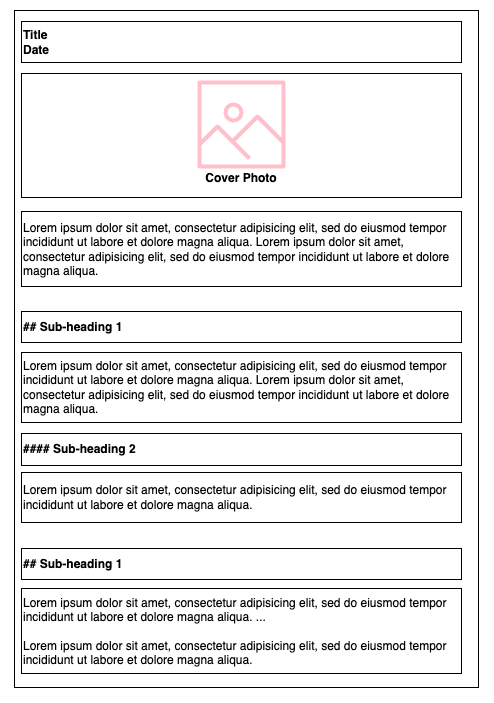
- Title and Date
- Cover Image
- Introduction
- Subheadings and Content
##for main sections####for subsections
Note: A post can contain multiple ## and #### subheadings, and all posts are written in Markdown.
Cleaning
Just like any other data project, all input needs be cleaned!
-
Remove any media (images and videos) and replace with placeholders (may be useful for chatbot ?)
-
Remove emojis
Gather Metadata
Store important information which could useful for the chatbot:
-
Title: Helps the chatbot reference the correct post when returning results. It also provides context about the content of the chunk.
-
Post date: Useful for sorting results chronologically, ideally I want the chatbot to return most recent information first.
-
Post content (cleaned): Main text that the chatbot retrieves and uses to generate responses.
-
Post filepath: A reference back to the original source, it could be useful for users to visit to the full post if they want more details.
Tokenisation
Tokenisation is the process of splitting text into smaller units called tokens.
For example, take the sentence:
“We are going to be late”
A very simple tokenisation might look like:
“We” , “are” , “going” , “to” , “be” , “late”
How text is tokenised can vary depending on the project. For example, when analysing the sentiment of text, common words such as “are”, “to”, or “for” are removed because they don’t really add much semantic value.
For my project, I plan to use default tokenisation provided by the embedding model. Since chatbots rely on the full semantics of the text, there is no need to remove stop words or to customise tokenisation like I have done in previous projects.
Important: I chunk the data first before tokenisation. The embedding model’s tokenisation will be applied when I create embeddings for each chunk. However, to ensure that each chunk stays within the model’s max token limit, I need to count tokens in advance, read on for more details!
Chunking
I’ve previously covered the concept of chunking in the Email Genie project, but as a quick recap: chunking is the process of breaking up large pieces of text into smaller chunks. This is needed to ensure content stays within the maximum input size of embedding models.
Default chunking methods typically split text once a token limit is reached. While this technically works, it can hurt quality of retrieval. Chunks may mix several unrelated topics, making it harder for a chatbot to retrieve the exact information it needs, potentially resulting in confusing responses.
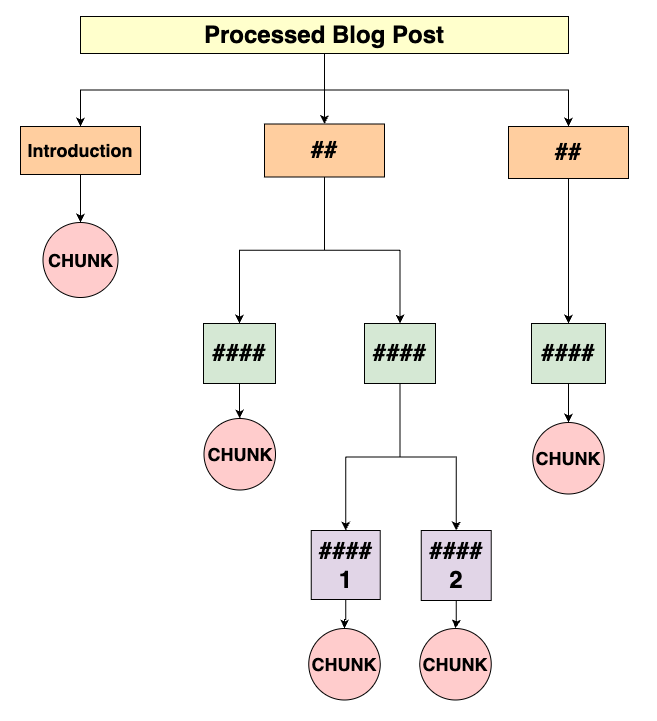
To avoid this, I used the structure of my blog posts to guide the chunking process. Posts are chunked based on the position of headings and subheadings, so each chunk represents a specific section of content and focuses on a single topic!
My Chunking Approach
Here’s a diagram illustrating my chunking method. Hopefully, it helps make the logic of my chunking function easier to follow:
Implementation Code
The chunk_content function implements the diagram above. It takes the cleaned post content and returns a list of chunks, each with a title and body.
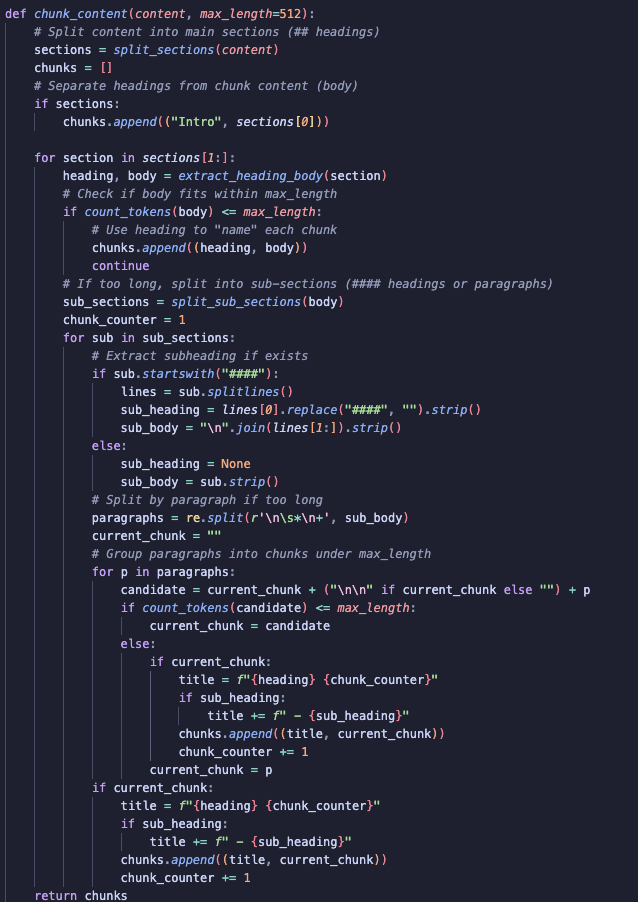
1) Split by Main Sections
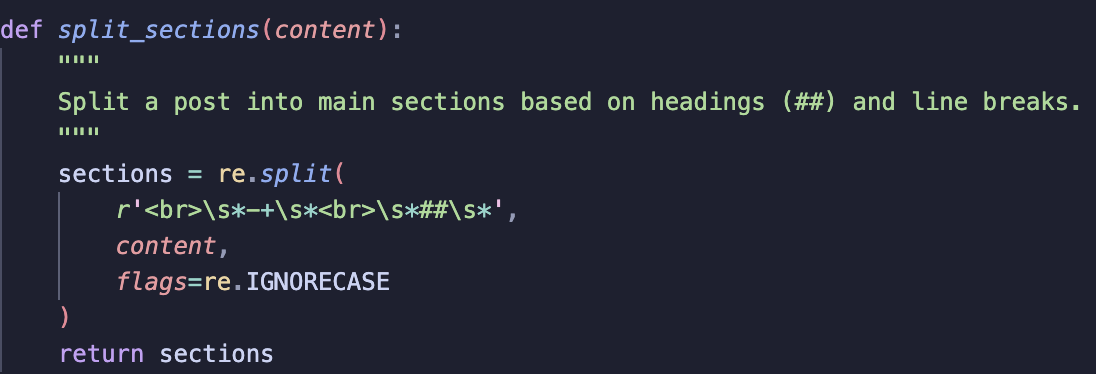
The post is divided into main sections, with the first section treated as the introduction. split_sections uses a regex to split at line breaks followed by ## headings, preserving the post’s structure.
2) Separate Headings from Content
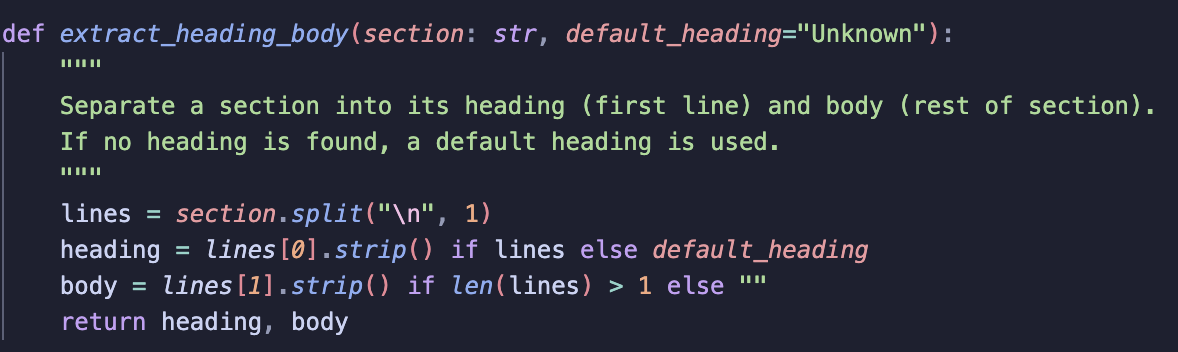
After splitting the post into sections, each section’s heading is separated from its body using extract_heading_body:
-
The first line becomes the chunk heading.
-
The rest becomes the body.
-
If a heading is missing, a default “Unknown” is used.
Giving each chunk a meaningful title helps the chatbot reference sections accurately later.
3) Check if the Section Fits Within the Token Limit
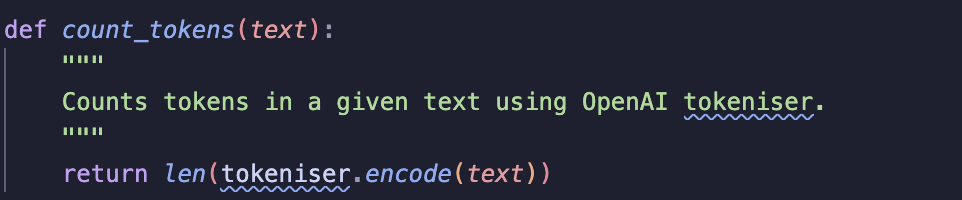
Next, I check the token count of each section using count_tokens:
-
If the section is short enough, it is added as a single chunk.
-
If it exceeds the model’s maximum token limit, further splitting is needed.
4) Split Large Sections into Sub-Sections
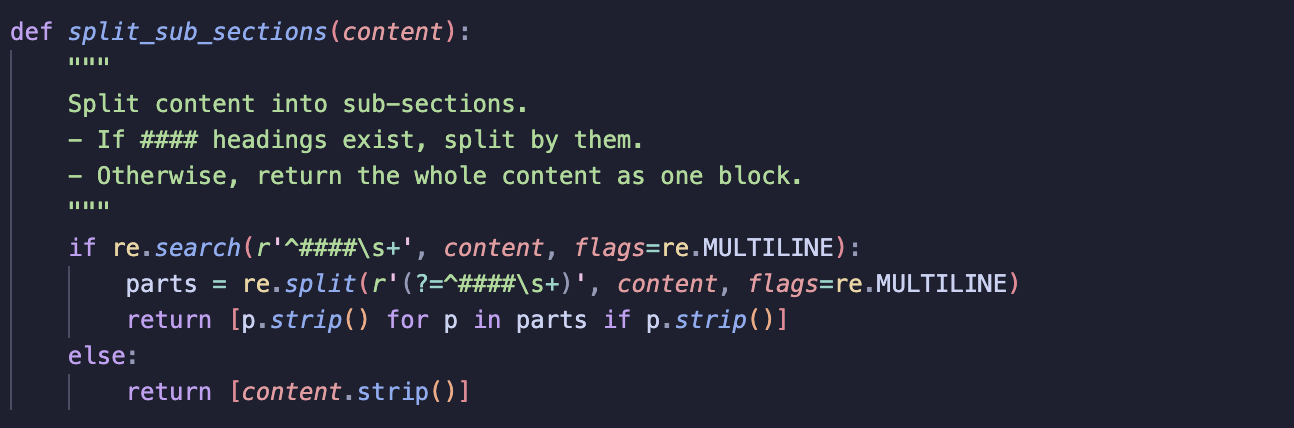
For sections that are too long, split_sub_sections is used to divide the content:
-
By
####subheadings if they exist -
If no subheadings exist, the section is treated as a single block and later broken down by paragraphs only when needed to stay within the token limit.
A chunk counter is used to number multiple chunks within the same section.
5) Process Each Sub-Section
Each sub-section is processed as follows:
- If the sub-section starts with a
####heading:- Extract the subheading
- Extract the sub-section body
- Otherwise, treat the entire sub-section as the body.
6) Split Sub-Sections by Paragraphs if Still Too Long
- If a sub-section is still too long, it is split into paragraphs.
- Paragraphs are grouped into chunks until the token limit is reached.
- My approach here does assumes individual paragraphs are always shorter than the maximum token limit, which is true for all previous posts. May be worth adding to this function when building final product and split by sentence if
current_chunk = pandcurrent_chunk > max_token_length. - Each chunk is given a heading, combining the main section heading, the subheading (if any) and the chunk number.
Create Embeddings
With the posts are chunked, the next step is to create embeddings for each chunk.
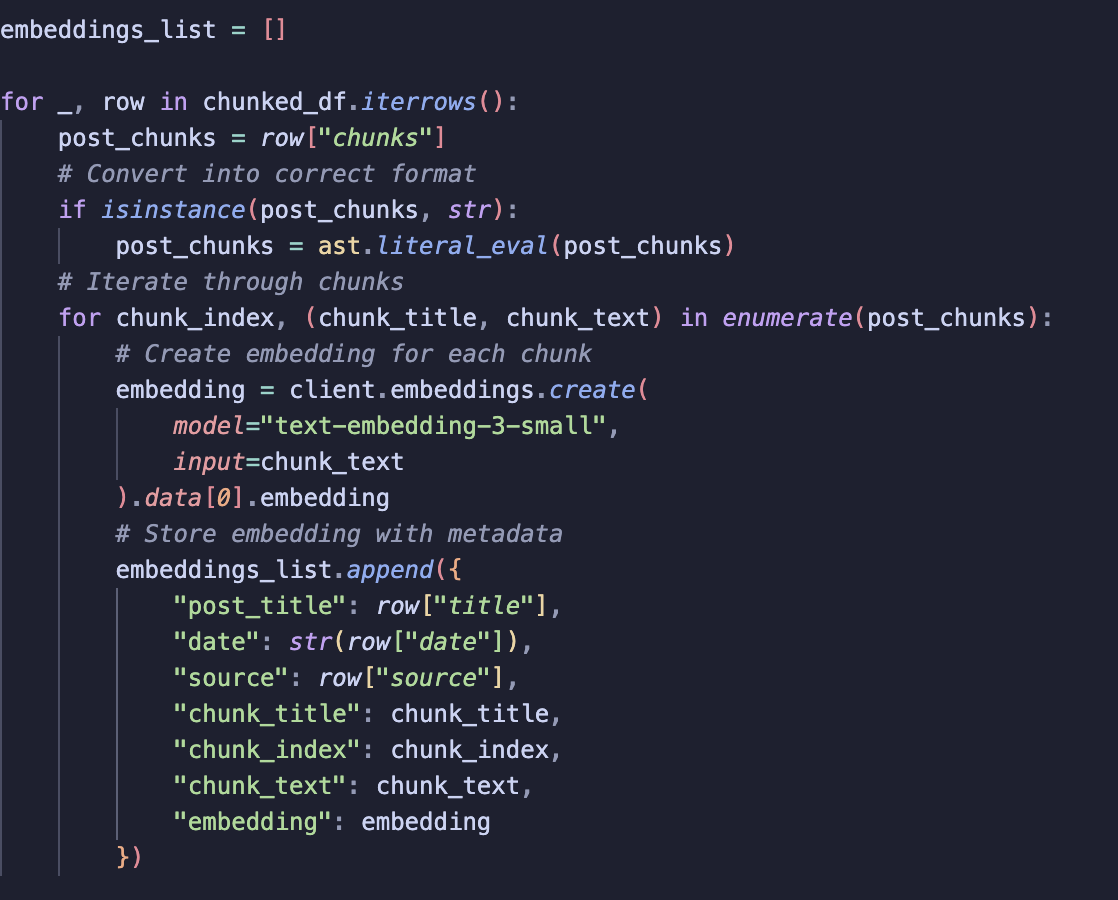
1) Iterate over each post
First, we go through each row of chunked_df. We make sure the chunks column is properly typed.
2) Iterate over each chunk in a post
For every chunk, we generate an embedding using the OpenAI embeddings API. In this case, we use the text-embedding-3-small model.
3) Store embeddings along with metadata
Each embedding is stored in a dictionary that includes:
-
post_title
-
date
-
source
-
chunk_title
-
chunk_index
-
chunk_text
-
embedding
All of these dictionaries are stored into a list.
Summary
I learned from the Email Genie project that retrieval suffers if cleaning and chunking aren’t done carefully. Getting preprocessing right is quite important and I’m glad I took the time to think through how best to chunk posts and consider the impact it will have on retrieval later.
The next step is to build a vector database with the post embeddings and start thinking about how retrieval will work for my chatbot.