SimBot: Improving Retrieval 🔧

In my last post, I shared how I set up basic vector retrieval using Pinecone. I touched on the idea of creating a test set to evaluate different retrieval methods. In this post, I’ll explain the methods I’m exploring, why I think they improve retrieval and how I’m testing them using the mini test set I created!
Creating a Test Set
My idea was to create an evaluation dataset of around 20/30 prompts, these prompts should be covering different scenarios:
-
Some are project or topic specific
-
Some are retrieving information across multiple posts
-
Some ask for the most recent information
This helps ensure that the final system can:
- Return the latest information
- Search across multiple posts to generate responses
Step 1: Define prompts
I created my set of prompts with the help of ChatGPT to make sure all the scenarios I wanted were included in the dataset.
Step 2: Expected Chunks
Next, I stored the chunks I expect the chatbot to return. I used basic retrieval (set up in previous post) as a baseline to see whether the extra methods I explore below actually add value.
To do this, I get the existing Pinecone index and store the top 3 chunks for each prompt.
Different Retrieval Methods to Evaluate
1. Keyword and Vector Retrieval
In my last blog post, I mentioned the idea of combining keyword and vector search.
Alone, keyword search can be quite accurate, it returns documents that contain the exact words you’re looking for, but it doesn’t understand the context of text. This means it can miss synonyms or related phrases.
On the other hand, vector search understands semantics of text and how words relate together. But sometimes it can return documents that are too loosely related and can struggle with accuracy.
Hopefully, by combining both approaches we get the best of both worlds!
2. Recency Aware Vector Retrieval
I also mentioned experimenting with recency-aware retrieval. The basic idea is to look at the dates of posts and prioritise content from newer posts.
Note: Most blog posts include a date but some pages like About Me or My Projects are not dated. Since I update these pages regularly, I backfilled these dates to today so they are prioritised!
How does Recency Aware Retrieval work?
Works similar to base retrieval but now recent documents are assigned a higher weight, so they are more likely to appear at the top of results, while older content is assigned a lower weight and deprioritised.
3. Keyword and Recency Aware Vector Retrieval
I was also curious to see if performance improves if I combined keyword search with recency-aware retrieval!
Implementation
I am always looking at ways to improve my coding skills, and I realised a lot of my personal projects are built in notebooks. This makes sense since I like to experiment with different approaches to see which one suits the projects best. However, even in notebooks, I should make use of class-based development. This will also help when I delpoy my chatbot later!
Classes
I create two classes: KeywordSearch and VectorSearch. Each uses a different method to return the most relevant text chunks for a given prompt.
KeywordSearch
The KeywordSearch class returns the top_k most relevant chunks using TF-IDF vectorisation and cosine similarity. It converts text chunks into vectors and compares them to a prompt to return the most relevant matches.
__init__
Initialises the class and vectorises all chunks using TF-IDF.

- Stores the input dataframe
- Calls
_vectorise_chunks_with_tfidf - Saves:
vectoriser: fitted TF-IDF vectorisertfidf_matrix: vector representation of each chunkmetadata_df: metadata linking vectors back to original chunks
Vectorisation is done once during initialisation to avoid recomputing it for every query (costly).
_preprocess_text
Cleans text before vectorisation.

- Removes excessive whitespace and non-ASCII characters
- Ensures consistent formatting before tokenisation and helps prevent noisy tokens
_vectorise_chunks_with_tfidf
Vectorises all chunks using TF-IDF and returns the vectoriser, TF-IDF matrix, and metadata.
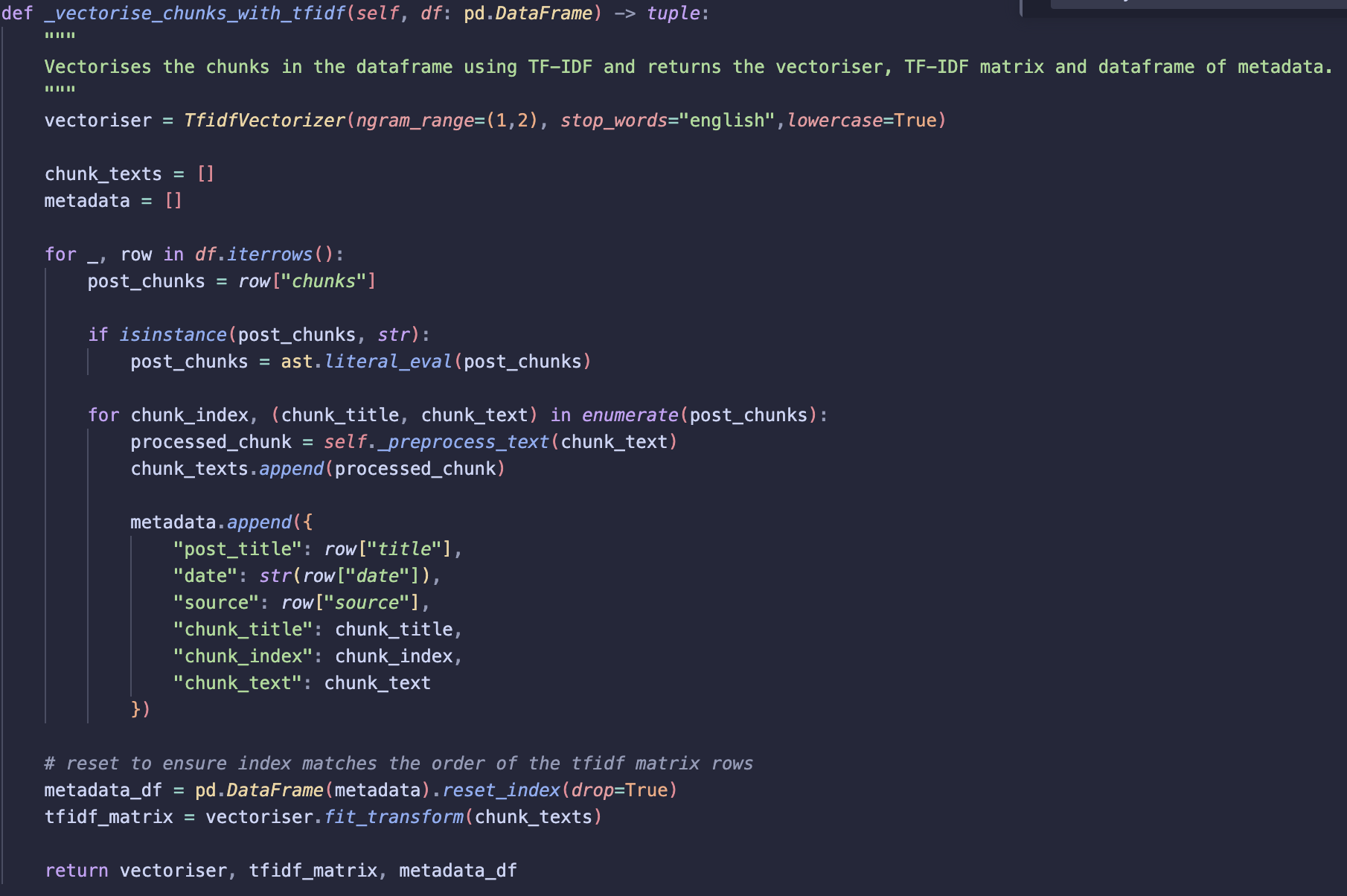
- Initialises vectoriser:
lowercase = Trueconverts all tokens to lower case so words such as Vector and vector are treated the same.ngram_range=(1,2)includes both single words (unigrams) and two word phrases (bigrams). Allows phrases such as “vector database” to be treated as a single token rather than two separate words (“vector” and “database”).stop_words= ‘english’ removes common words (e.g. the, at, a). These words appear frequently so generally don’t help distinguish relevant
- Iterate through dataframe rows, extract chunk titles and texts
- Apply preprocessing to chunk text
- Store processed chunks along with metadata
- Apply
fit_transformon chunk_texts - This returns a TF-IDF matrix where:
- rows represent chunks
- columns represent vocabulary terms
- values represent TF-IDF weights
Note: Metadata dataframe index is reset before vectorisation to ensure alignment!
retrieve
Returns the most relevant chunks for a given prompt.
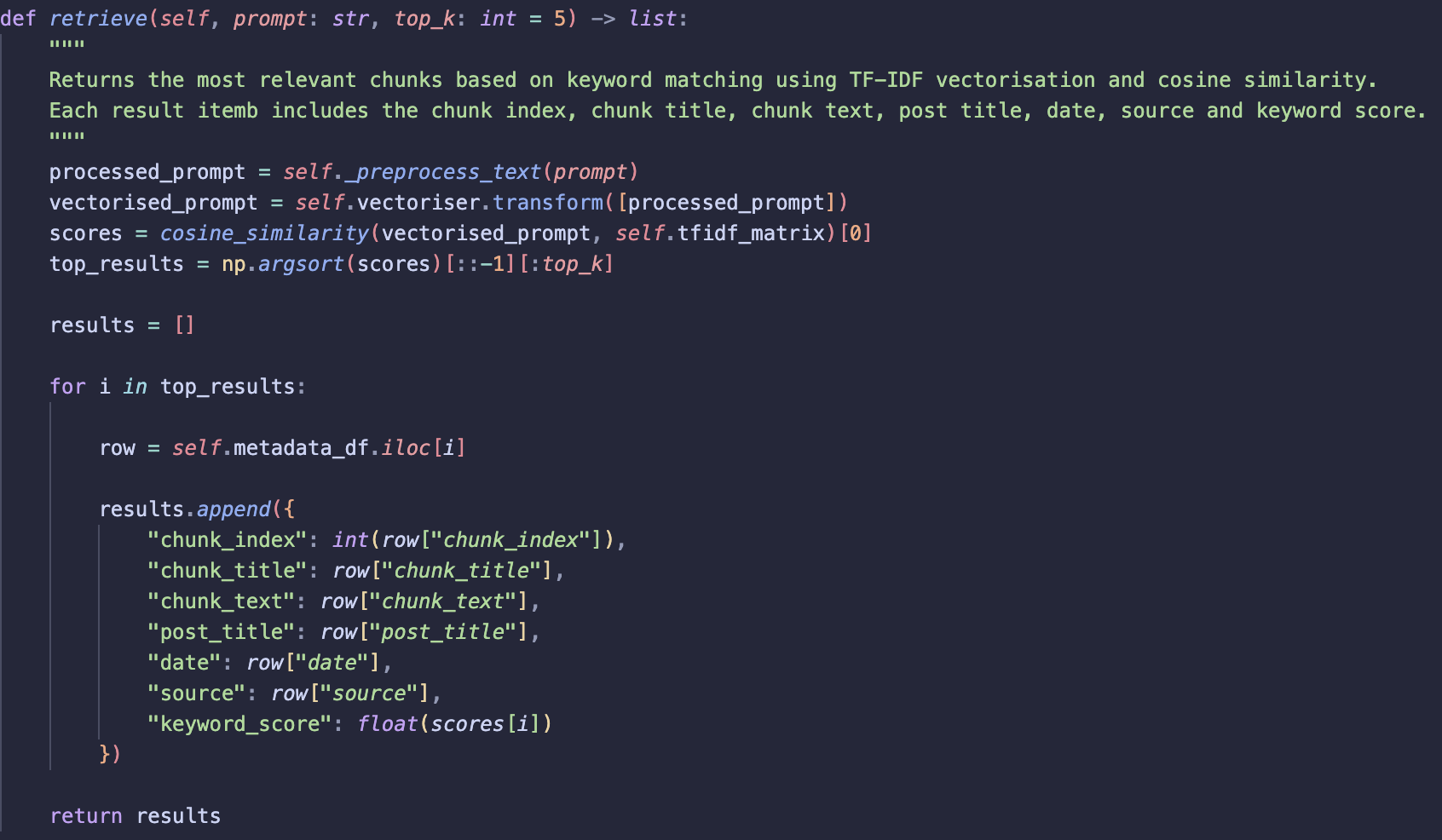
- Apply
_preprocess_textto the input prompt. - Vectorise the prompt using the same fitted vectoriser from
_vectorise_chunks_with_tfidf. - Calculate similarity between the prompt vector and each chunk vector using cosine similarity.
-
Sort similarity scores and return the
top_kmost relevant chunks. - For each result:
- Retrieve the corresponding metadata row.
- Return the chunk information along with the similarity score.
VectorSearch
The VectorSearch class retrieves the most relevant chunks using semantic vector similarity from a Pinecone vector database. It also includes a recency scoring to allow more recent posts to be prioritised when retrieving results.
__init__
Initialises vector search

- Connects to the Pinecone index using
index_name - Stores the index so it can be used by other methods
clean_date
Converts raw date metadata into a valid datetime object.
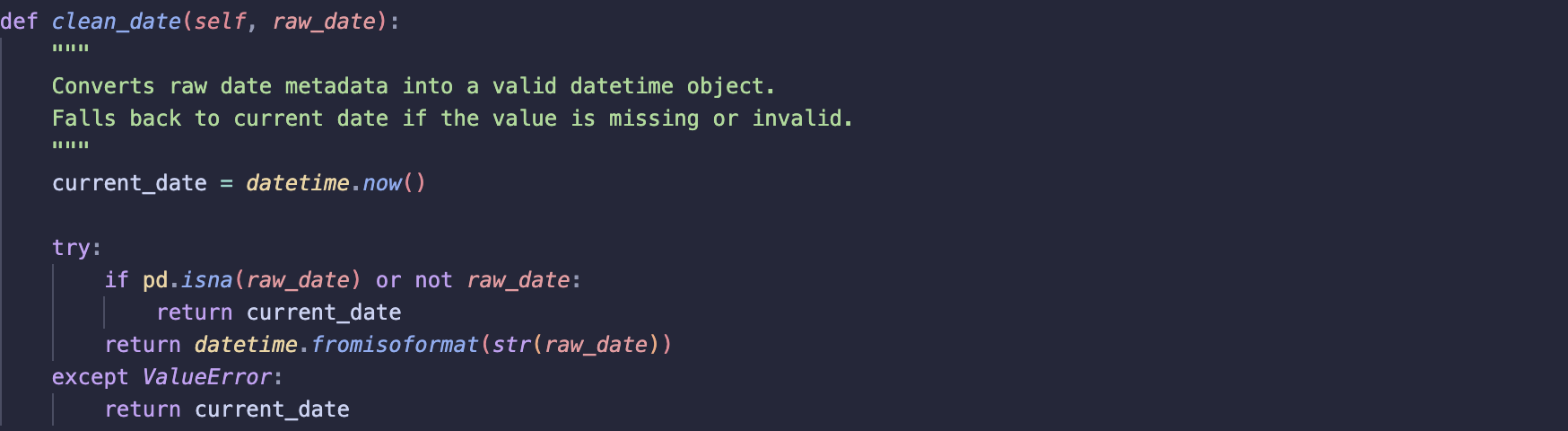
- Attempts to parse the date using
datetime.fromisoformat - If the date is missing or invalid, the current date is returned
Assumption:
- Most posts contain valid dates.
- Posts with missing dates are (to date) regularly maintained and updated so backfilling date to current date seems logical.
recency_score
Calculates a recency score based on the date of posts
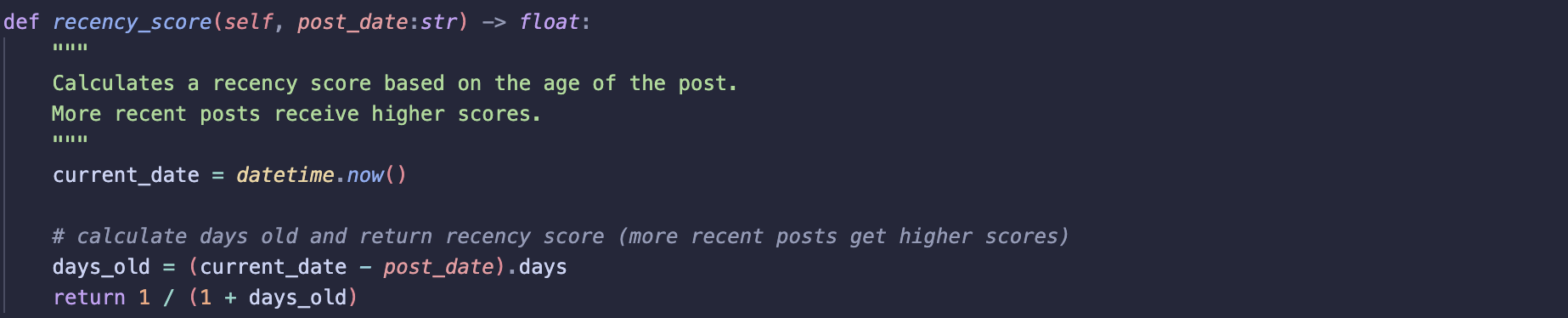
- First calculates the number of days between the post date and the current date
- Calculate recency score, idea is that id a post is very recent score approaches one if post is older
days_oldincreases and score moves to 0 - Ensures more recent posts are assigned higher scores
combine_vector_score_with_recency
Combines the vector similarity score with the recency score.

- Uses
alphato control weighting
-
Where:
α = 1.0: only vector similarity is used (no recency influence)α = 0.0: only recency is considered
This allows the method to support both semantic only and recency aware retrieval.
retrieve
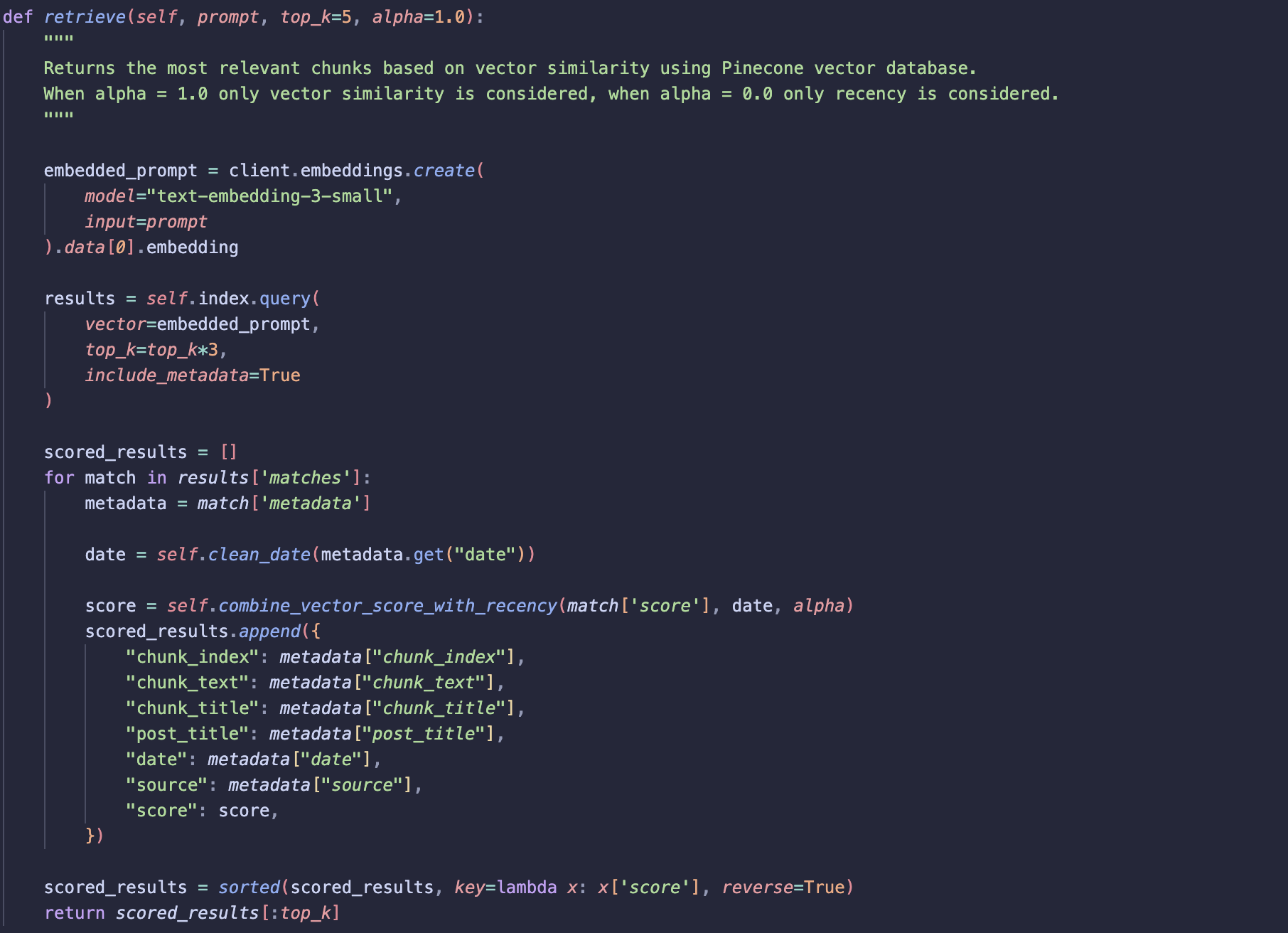
Returns the most relevant chunks based on semantic similarity and optional recency weighting.
-
Embed the given prompt using the same model used to generate vectors stored in the vector database.
- Unlike keyword search:
- No preprocessing
- No stop word removal (embedding models rely on full context to capture semantic meaning)
-
The prompt embedding is then used to query the Pinecone index.
- More results than required are retrieved initially:
- Ensures results can be re-ranked using the recency score
- Prevents relevant results from being dropped before recency scoring
- Finally:
- Results are sorted by the combined score
- The
top_kresults are returned
Using classes to try different retrieval methods
Now that classes are set up, we can run keyword search, vector retrieval and recency-aware retrieval. The next step is to start combining different approaches.
1. Keyword Search and Vector Search (basic retrieval)
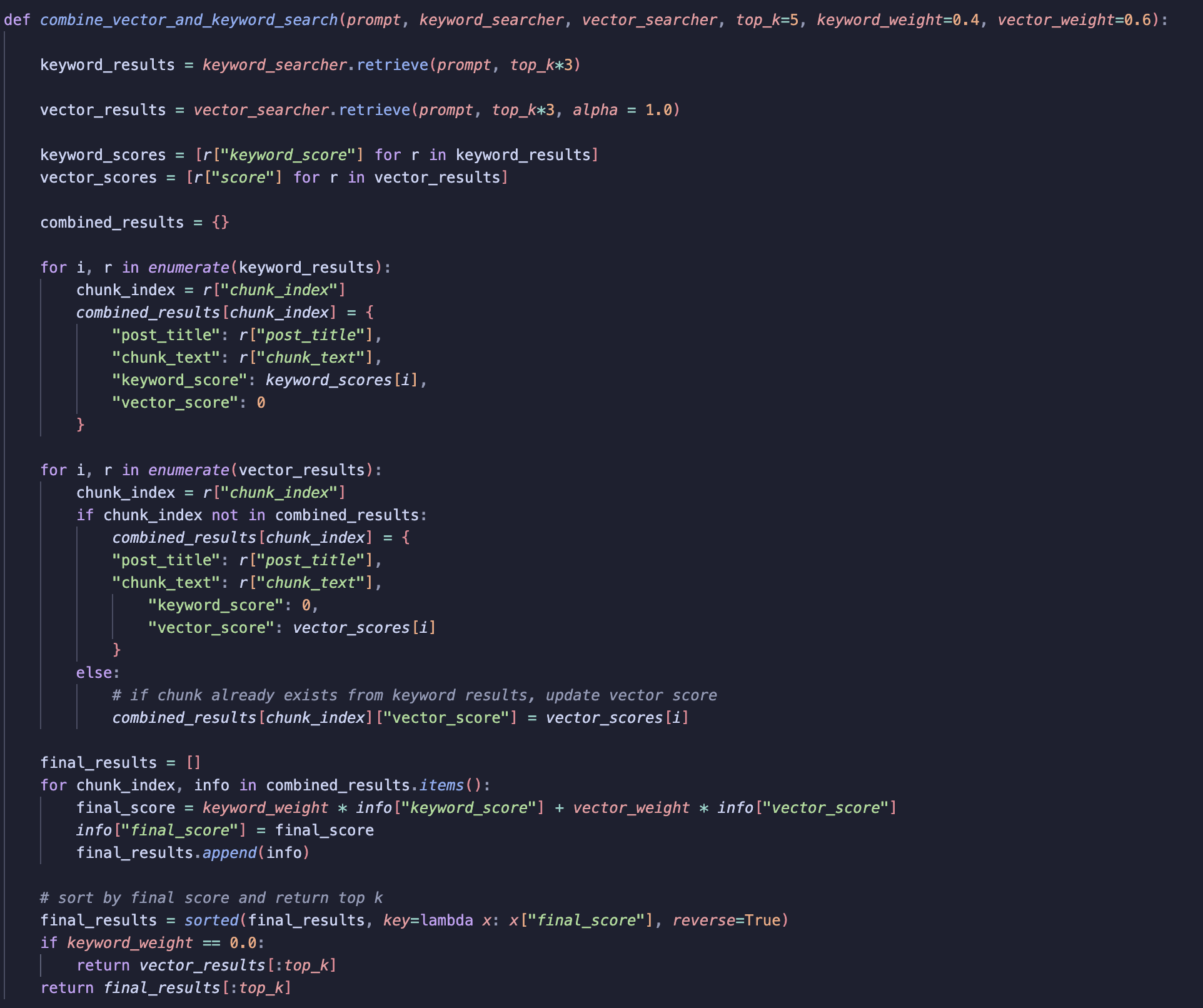
The first step is to run keyword and vector search. We want to return more than top_k results, since later we will combine results and need to rerank them.
-
Iterate over the keyword results. For each result, add the score (along with other metadata) to combined_results.
-
Repeat the process for vector results, setting the keyword score to 0 (and vice versa).
-
If a chunk is returned by both keyword and vector search, add the vector score to the combined results.
-
Apply weightings to the vector and keyword scores. Use these weights to control how much influence each method has.
-
Compute the final score using matrix multiplication, sort in descending order and return the
top_kresults.
2. Recency Aware Retrieval

This is straightforward, call the VectorRetrieval class and set the alpha parameter to a value < 0.5 (e.g., 0.4). This controls how much weight we give to the date of a post versus relevance. The lower alpha is, the more we prioritise recent posts.
Note: alpha becomes a hyperparameter that can be tuned.
3. Keyword Search with Recency Aware Retrieval
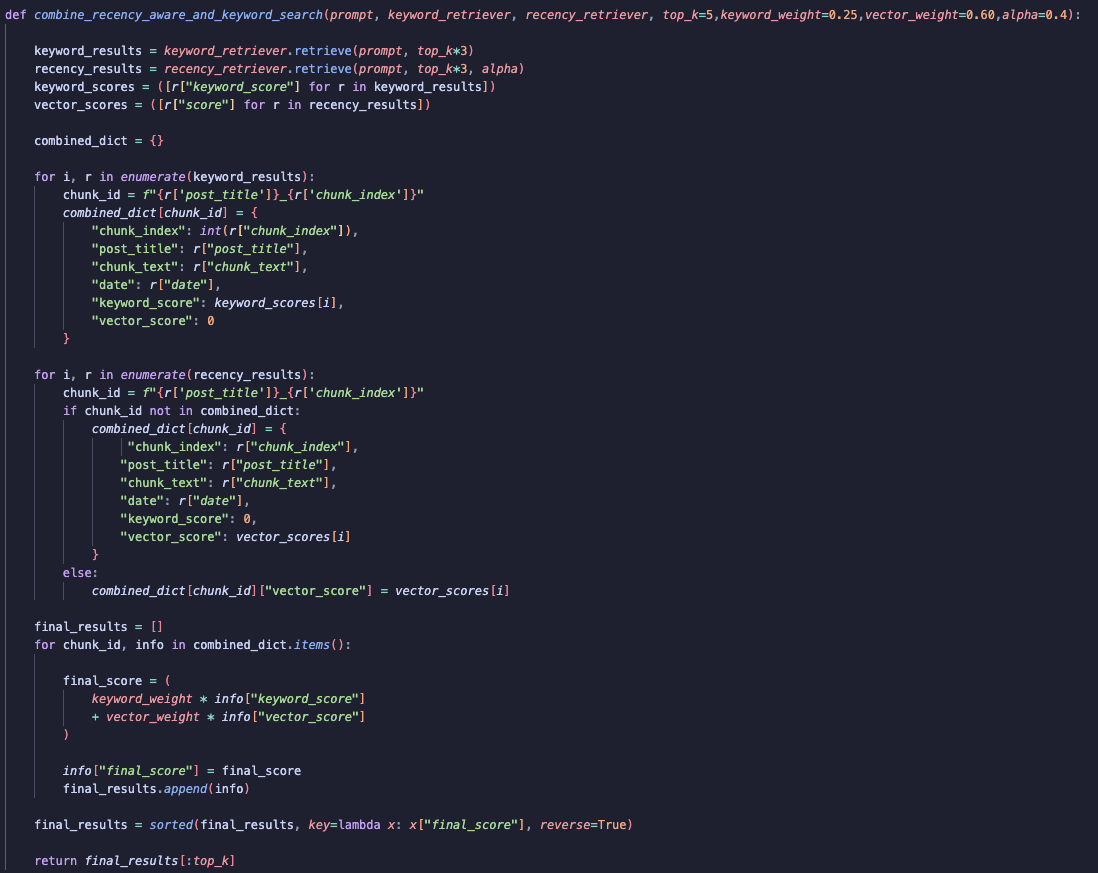
This process is similar to Keyword and Vector Search, but now we incorporate the alpha parameter in the vector retrieval step to account for recency.
Evaluation
To evaluate my retrieval system, I used a simple baseline approach to return the top 3 chunks using basic vector search. The goal was to compare whether combining retrieval methods could outperform the baseline.
How I calculate precision
To measure performance, I focused on precision, since I care most about how accurate the retrieved chunks are.
First, I created a ground truth dataset. For each expected chunk, I created a unique ID by combining:
-
post_title -
chunk_index
This results in IDs like: “From Zero to Data Hero_0”
This format makes the results easy to generate, compare and interpret.
Next, I apply the same ID generation function to the chunks returned by the retrieval system.
Finally, I calculate precision using a set-based comparison:
-
Count how many retrieved chunk IDs match the expected chunk IDs
-
Divide by the total number of retrieved chunks
In other words:
\[\text{precision} = \frac{\text{Number of correct retrieved chunks}}{\text{Total retrieved chunks}}\]This tells me how many of the returned results are actually relevant.
Results
Earlier, I mentioned hyperparameter tuning, which is the process of finding the best parameter values to maximise performance. In this case, the key parameters I can tune are:
-
Keyword weight
-
Vector weight
-
Alpha (controls recency)
To evaluate which combination works best, I use precision on a test set as my metric.
Grid Search
To find the best parameters, I needed to explore different parameter combinations, I used a grid search.
Grid search works by defining a range of possible values for each parameter and then trying every possible combination within that range.
Simple Example
Imagine you’re tuning just two parameters:
-
Keyword weight:
[0.2, 0.5, 0.8] -
Vector weight:
[0.8, 0.5, 0.2]
Grid search will try all valid combinations:
(0.2, 0.8), (0.5, 0.5), (0.8, 0.2)
Each pair is evaluated, and the one with the highest precision is selected.
What I Did
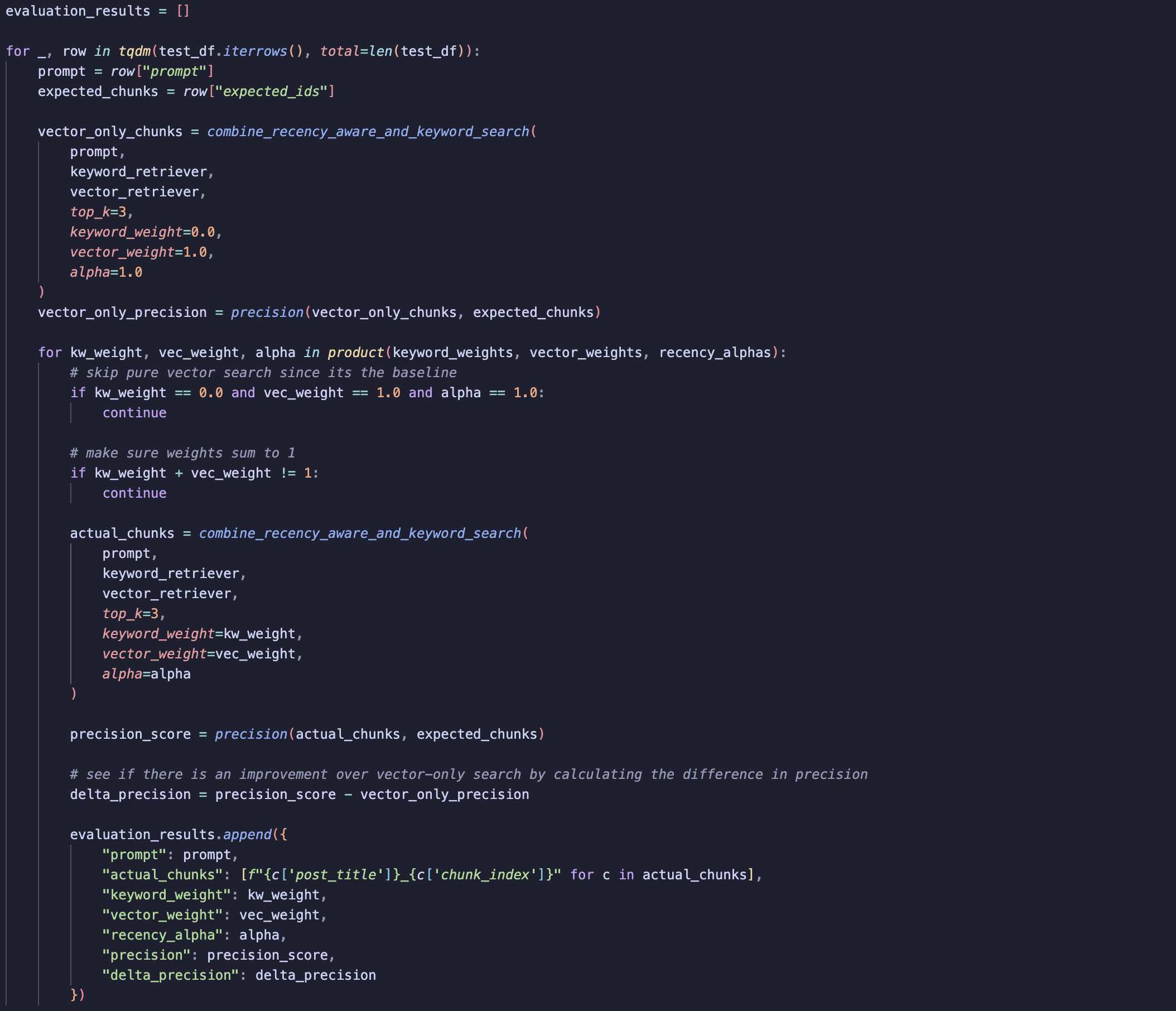
- Set parameter ranges
- Defined ranges for keyword weight, vector weight, and alpha
- Establish a baseline
- Calculated precision using only vector search (serves as the baseline)
- Iterate over the test dataset (for each test example)
- Generated all parameter combinations using a grid (via
product) - Skipped cases that reduce to pure vector search (already covered by baseline)
- Ensured
keyword_weight + vector_weight = 1 - Ran retrieval:
- For each parameter combination, called
combine_recency_and_keyword_search - (This function uses keyword, vector, and recency components)
- For each parameter combination, called
- Generated all parameter combinations using a grid (via
- Evaluate performance
- Calculated precision by comparing retrieved chunks with expected chunks
- Computed the difference from the baseline precision (vector-only search)
- Store results
- Recorded all scores
Takeaways
The results showed no real improvement over baseline retrieval, suggesting that adding keyword weighting and recency didn’t really add much.
One likely reason is a bias in the test dataset, since the ground truth was generated using vector search, any deviation from vector results like adding keyword search tends to produce worse results, even though in the real-world it might actually improve retrieval.
That said, I still think using a combination of keyword, vector and recency retrieval is a sensible starting point. And so, I’ll start with hybrid retrieval and adjust the weights later if needed!
Summary
In this post, I explored building a flexible retrieval system for my chatbot, experimenting with keyword, vector and recency-aware methods. I showed how class-based design makes it easier to test and tune parameters and how a grid search helps find the best combination of weights.
While the mini test set didn’t show large improvements over vector-only retrieval, I feel confident in using hybrid retrieval. My next steps are to productionise the chatbot and integrate it into my blog, so I can see how hybrid retrieval performs with actual user queries.