SimBot Has Skills: Recommend Blog Posts 📖

Previously, I explained how skills are defined in my project, and how I’m building a tool-calling system to turn my retrieval chatbot into an AI-like tutor using my blog posts as the knowledge base.
In this post, I introduce my first skill: Recommend Blog Posts. I’ll share why its needed and how I implemented it. There are still a few tweaks I want to make but overall I’m happy with how this first version works!
Skill Overview: Recommend Blog Posts
The purpose of this skill is twofold:
1. Defining a learning path
The main goal is to recommend blog posts based on the user’s query. For example, if a user asks “I want to learn about embeddings”, the chatbot should return something like:
Recommended Reading:
This is important for the tutor mode, where users will be able to select a topic and then follow a structured learning path.
2. Follow-up reading after questions
When answering a question, users may benefit from suggestions on what to read next. This helps them continue exploring topics, especially if they are not sure what to ask next.
For now, this skill is called within the RAG retrieval skill so that after generating an answer, the system can recommend what to read next.
NOTE: The RAG logic has now been moved into its own dedicated skill. This is because the orchestrator will be calling each skill independently.
Skill Implementation
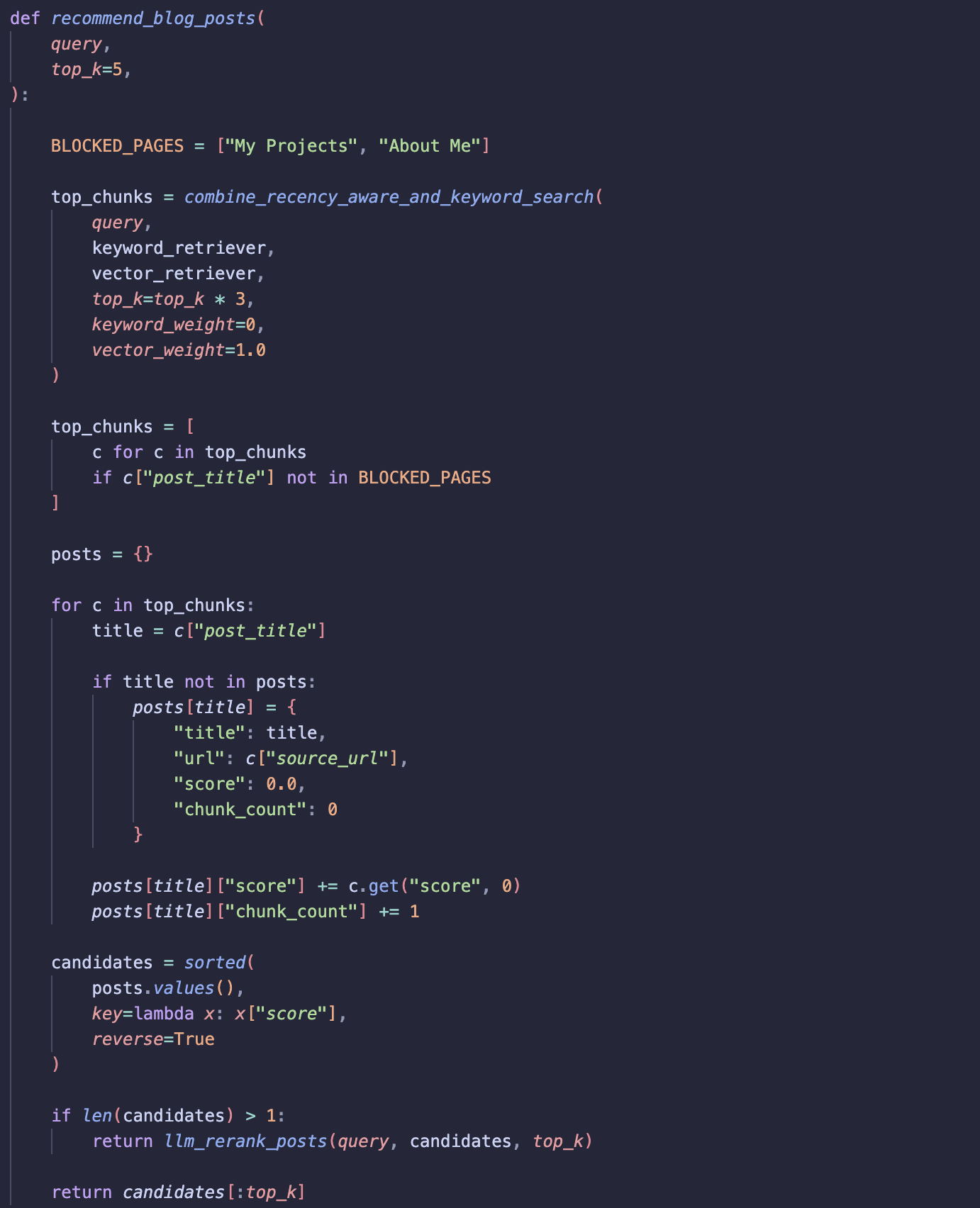
Here is a screenshot of the skill logic:
Step 1: Retrieval
We start by retrieving the most relevant chunks for a given user query using vector-based search and the top_n chunks are returned.
Step 2: Aggregate posts
Retrieved chunks are grouped back into their “parent” blog posts.
Each post receives an aggregated score based on its chunks. This helps determine which full posts are most relevant to the user’s query, since we want recommendation at post level not at chunk level.
Step 3: Create candidates
Build a list of candidate blog posts.
Step 4: Ranking
I added this step after some testing and may refactor or remove it later.
Candidates are re-ranked based on how useful they are for the user’s query. By passing candidates to the LLM, we can use the titles and scores from vector search to improve the final ranking of posts to recommend.
Orchestrator Implementation
The orchestrator is responsible for deciding which skill to call based on the user’s query. For now, it only supports calling one skill at a time and I’ve purposely kept it quite simple.
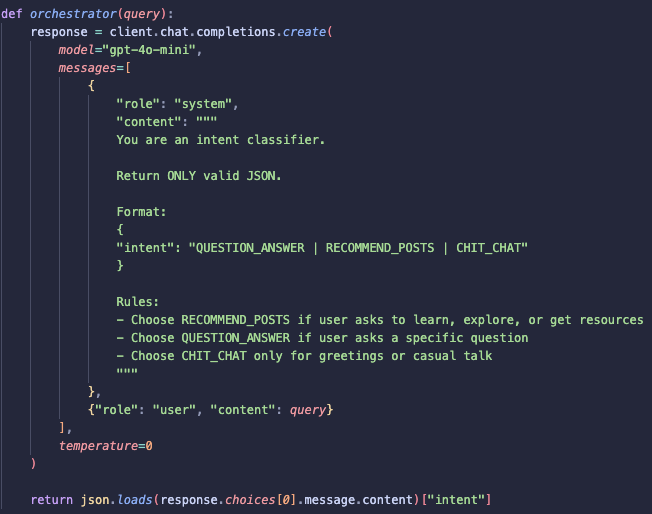
The basic idea is to first identify the intent behind the user’s message, for example, whether they are asking a question or wanting to learn about a topic. Based on the intent, the orchestrator chooses the appropriate skill to call.
As I continue building more skills, I’ll keep the orchestrator simple. In the future, the orchestrator should be able to call a chain of skills for a single query when needed.
Summary
Next, I will focus on building the second skill: the Explanation Skill. This skill is designed to help users understand concepts more deeply rather than just retrieving information through RAG-based search!